Frequently Asked Questions
Answers to common questions about building with Embeddable. Select a question to see its answer.
Are Cancelled Queries on Dashboard Load Normal?March 26, 2026
When your dashboards are loading, sometimes you might see cancelled queries in the network tab, like so:
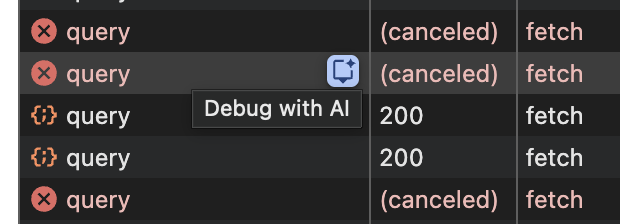
This happens when a component immediately updates variable values after they are rendered and is nothing to worry about ☺️ If you have any concerns please drop our team a message.
How Do I Use Tailwind CSS Inside Embeddable Custom Components (Remarkable)?March 25, 2026
Tailwind utility classes don’t apply consistently inside Embeddable components because the embedded experience runs inside a shadow DOM, which blocks external stylesheets from penetrating the component scope. CSS variables do pass through the shadow DOM boundary, but class-based styles do not.
You don’t need to abandon Tailwind — here’s how to make it work.
Step 1: Add a Tailwind config to your boilerplate repo
Create a tailwind.config.js at the top level of your boilerplate repo. At minimum it should look like this:
/** @type {import('tailwindcss').Config} */
module.exports = {
  darkMode: 'class',
  content: ['./index.html', './src/**/*.{js,ts,jsx,tsx}'],
  theme: {
    extend: {},
  },
  plugins: [],
};
Step 2: Add an index.css to your components folder
Create a src/components/index.css (or equivalent) that begins with:
@tailwind base;
@tailwind components;
@tailwind utilities;
This injects the necessary Tailwind styles so your classes resolve correctly at runtime.
Arbitrary values won’t work — extend the config instead
Embeddable doesn’t support Tailwind arbitrary values like border-[#888888]. Instead, extend your Tailwind config with named tokens:
theme: {
  extend: {
    borderColor: {
      'controls-multiselector': 'var(--embeddable-controls-multiSelector-borderColor)',
    },
  },
},
Then reference them as standard utility classes like border-controls-multiselector.
Tailwind 4 note
The approach above is confirmed working with Tailwind 3. If you’re on Tailwind 4, some tweaks may be needed — reach out if you run into issues and we can help you through it.
How Do I Call Table-Valued Functions With FILTER_PARAMS?March 24, 2026
If your database has an existing table-valued function (TVF) that accepts parameters (e.g. a date range), you can call it dynamically from a Cube model using FILTER_PARAMS. The function executes with the exact range the user selects in the dashboard — no static table scan required.
How it works
Write the cube’s sql as a subquery that:
- Uses
FILTER_PARAMStwice — once to extract thefromboundary, once for thetoboundary — using a lambda that returns just one value each time. - Passes those values as parameters to your function via
CROSS JOIN LATERAL(PostgreSQL) or the equivalent for your database.
cubes:
  - name: my_tvf_cube
    sql: |
      SELECT t.*
      FROM (
        SELECT
          {FILTER_PARAMS.my_tvf_cube.event_time.filter(
            lambda x, y: f"{x}"
          )}::timestamp AS from_time,
          {FILTER_PARAMS.my_tvf_cube.event_time.filter(
            lambda x, y: f"{y}"
          )}::timestamp AS to_time
      ) params
      CROSS JOIN LATERAL public.my_function(params.from_time, params.to_time) t

    dimensions:
      - name: event_time
        sql: event_time
        type: time

      # ... other columns returned by your function
The lambda x, y: f"{x}" / lambda x, y: f"{y}" callbacks tell Cube to extract just the start or end boundary of the filter — rather than generating a full col >= x AND col <= y condition.
Supported databases
| Database | Lateral join syntax |
|---|---|
| PostgreSQL | CROSS JOIN LATERAL my_func(from_time, to_time) t |
| Snowflake | TABLE(my_func(from_time, to_time)) in the FROM clause |
| BigQuery | CROSS JOIN UNNEST(my_tvf(from_time, to_time)) |
| SQL Server | CROSS APPLY dbo.my_func(from_time, to_time) |
Can a TVF cube join to other models?
Yes. You can define joins on a TVF cube exactly as you would on any other cube. FILTER_PARAMS resolves correctly when the cube is queried alongside a joined model. A common pattern is enriching TVF results with a dimension table (e.g. businesses, users, products):
joins:
  - name: businesses
    sql: "{CUBE}.business_id = {businesses}.id"
    relationship: many_to_one
Two things to keep in mind:
- Only matched rows are returned — dimension table rows with no corresponding TVF results are excluded. If a business has no transactions in the selected date range, it won’t appear in the results.
- The join is defined on the TVF cube — the TVF cube owns the foreign key and declares the
many_to_onerelationship to the dimension table.
Do I need a TVF, or will a stored procedure work?
You need a table-valued function. Stored procedures won’t work here.
The reason is that CROSS JOIN LATERAL (and its equivalents) require something that returns a result set — i.e. something you can SELECT from. TVFs satisfy this because they return a table. Stored procedures do not — they use CALL and have no return value that can sit in a FROM clause.
This applies across all supported databases:
| Database | Stored procedure | Table-valued function |
|---|---|---|
| PostgreSQL | CREATE PROCEDURE + CALL — not queryable | CREATE FUNCTION ... RETURNS TABLE ✓ |
| SQL Server | CREATE PROCEDURE + EXEC — not queryable | CREATE FUNCTION ... RETURNS TABLE ✓ |
| Snowflake | CREATE PROCEDURE + CALL — not queryable | CREATE FUNCTION ... RETURNS TABLE ✓ |
If you’re currently using a stored procedure, convert it to a table-valued function first. In PostgreSQL, that means replacing CREATE PROCEDURE with CREATE FUNCTION ... RETURNS TABLE (...).
Limitations
- Time ranges only — the
x/ycallback only populates forinDateRangefilters. Other filter types (equals, contains, etc.) don’t provide two boundary values. - No filter = likely error — if the user doesn’t apply a date range, both values are
null, which will typically cause a database error or return no rows. Enforce a default date range in your component to prevent this. - No pre-aggregation support — pre-aggregations cannot accelerate queries built on TVFs.
Related docs
Which Multi-Stage Calculations and Nested Aggregates Work in Embeddable (Cube v1.3.24)?March 13, 2026
Q: What are multi-stage calculations and nested aggregates in Cube?
Multi-stage calculations are computed measures that depend on the results of other aggregated measures — essentially, calculations built on top of calculations. Nested aggregates are a related concept where one aggregate function is applied over the result of another. Both features allow you to express more complex analytical queries directly in your Cube data model.
Q: Don't these features require the Tesseract SQL planner?
According to Cube's documentation, multi-stage calculations and nested aggregates are listed as requiring the Tesseract SQL planner (enabled via the CUBEJS_TESSERACT_SQL_PLANNER environment variable). However, our testing with Cube v1.3.24 in the Embeddable workspace revealed that a significant subset of these features work correctly even without Tesseract fully enabled.
Q: What exactly was tested?
We created separate data models for each feature — multi-stage calculations and nested aggregates — and validated them against the Embeddable workspace running Cube v1.3.24. The goal was to determine which capabilities are functional out of the box and which are blocked by the absence of full Tesseract support.
Q: What features work in Cube v1.3.24 without Tesseract?
The following features were validated and work correctly:
| Docs | Feature | Notes |
|---|---|---|
| Rolling Window | Rolling window (trailing, unbounded) | Date range filter required |
| Period-to-date | Period-to-date (type: to_date YTD/QTD/MTD) | Date range filter required |
| Time-shift | Time shift (time_shift) | ✅ |
| Fixed dimension | Fixed dimension / percent of total (group_by) | ✅ |
| Nested aggregated (add_group_by) | Nested aggregate (add_group_by) | ✅ |
| nested aggregated (sub_query: true) | Classic nested aggregates (sub_query: true) | ✅ No Tesseract needed |
| Listed here on docs. | Pre-aggregations with multi-stage | ❌ Not accelerated — documented Cube limitation, not version-specific |
Q: What features do NOT work in Cube v1.3.24?
| Docs | Feature | Why it fails |
|---|---|---|
| Ranking | type: rank on measures | Build error — not in accepted enum values |
| Switch in dimension | type: switch on dimensions | Build error — not in accepted enum values |
| Conditional Measure | Conditional measure (case/switch) | Blocked by type: switch not being supported |
| Rolling Windows without filter | Rolling windows without a date range filter | Runtime error: "Time series queries without dateRange aren't supported" — resolved in Tesseract |
Q: Why do rolling windows require a date range filter?
In Cube v1.3.24 without Tesseract, time series queries — including rolling windows and period-to-date calculations — require an explicit date range filter to function. Without one, the query fails at runtime. Tesseract resolves this by supporting time series queries without a mandatory date range, but until Tesseract is fully available, you'll need to ensure a date range filter is always applied.

Q: What should I do if a feature I need isn't supported?
If your use case depends on ranking, switch-based dimensions, conditional measures, or filterless rolling windows, these are currently blocked in Cube v1.3.24 without Tesseract. Your options include restructuring the logic using supported features (e.g., using sub_query: true for nested aggregates, or applying date range filters for rolling windows), or reaching out to the Embeddable or Cube support teams for guidance on workarounds. Full support is expected when Tesseract becomes available in a future Cube release.
Q: Will full Tesseract support be available in a future version?
Tesseract is an actively developed component of the Cube platform. Full support is expected in future releases, which would unlock the complete set of multi-stage and nested aggregate capabilities — including ranking, switch types, conditional measures, and filterless rolling windows. Check the Cube changelog and Embeddable release notes for updates on Tesseract availability.
Do I Need to Provide Security Context in the Tokens API?March 6, 2026
Technically, yes, securityContext is a required body value when using the tokens API to retrieve a token. Most users do need it, in order to enforce row level security. If row level security is not a concern, or you are enforcing it in some other way, or you’re testing, you can provide a blank object as the value and the tokens API will return successfully:
securityContext: {},
How Do I Use OR Filters (e.g. country = FR OR CA) in Embeddable?March 3, 2026
Can I build an OR filter like country = 'FR' OR country = 'CA'?
Yes — if you pass multiple values to a single filter, Embeddable treats it as an OR (SQL IN).
Example (code-based datasets / loadData)
loadData({
  filters: [
    { property: "country", operator: "equals", value: ["FR", "CA"] },
  ],
})
This generates SQL like:
WHERE country IN (?, ?)
Why doesn’t it work if I add two filters?
Because multiple separate filters are combined with AND logic.
-
✅ Single filter + array of values → OR (
IN) -
❌ Two filters on the same field → AND (
country = 'FR' AND country = 'CA')
Can I do this from the Dashboard / Dataset UI (no code)?
Yes — use this workaround:
Workaround: Multi-value text variable
-
Create a Text variable.
-
Enable Multiple values.
-
Enter each value on a new line, for example:
FR CA -
Go to your dataset, add a filter:
-
Operator: equals
-
Value: connect it to the variable you created
-
Result: the dataset will return rows where country is FR OR CA, which works well for things like KPI components that reuse a dataset.
Can I build more complex logic like (A AND B) OR C?
Not yet. Dataset filters currently apply simple AND across filters. Nested AND/OR logic is a roadmap item - give it a vote!
What’s the Difference Between Embeddable Managed Cube and My Own Cube Core / Cube Cloud?March 2, 2026
What are the two ways to use Cube with Embeddable?
Embeddable supports two ways of working with Cube:
1️⃣ Embeddable Managed Cube (Default)
This is the built-in, fully managed Cube layer that comes included with Embeddable. It is the default experience and what most of our documentation refers to.
With Embeddable Managed Cube:
-
Data modelling is done inside Embeddable.
-
Database connections are configured in Embeddable.
-
Environments are managed in Embeddable.
-
Caching and pre-aggregations are managed by Embeddable.
2️⃣ Cube Core / Cube Cloud (BYOC — Bring Your Own Cube)
In this setup, you run your own Cube instance:
-
Self-hosted Cube Core, or
-
Managed Cube Cloud
You connect your Cube instance to Embeddable via the Data Provider API.
With BYOC:
-
All data modelling is done in your own Cube instance.
-
Database connections are configured in Cube.
-
Environments are managed in Cube.
-
Caching and pre-aggregations are managed in Cube.
Embeddable connects only through the Data Provider API.
Why does the UI look different for Cube Core / Cloud customers?
Most of Embeddable’s UI and documentation assume you are using Embeddable Managed Cube.
If you are using Cube Core or Cube Cloud, some features will not appear or will not apply to you — and this is expected behaviour.
Below are the key differences.
Why can’t I see the Data Model Editor?
The Data Model Editor is only available to Embeddable Managed Cube customers.
If you are using Cube Core or Cube Cloud:
-
You define and manage models inside your own Cube instance.
-
Those models are then synced into Embeddable.
-
You do not need the Data Model Editor in Embeddable.
If you cannot see it, nothing is wrong — it simply doesn’t apply to your setup.
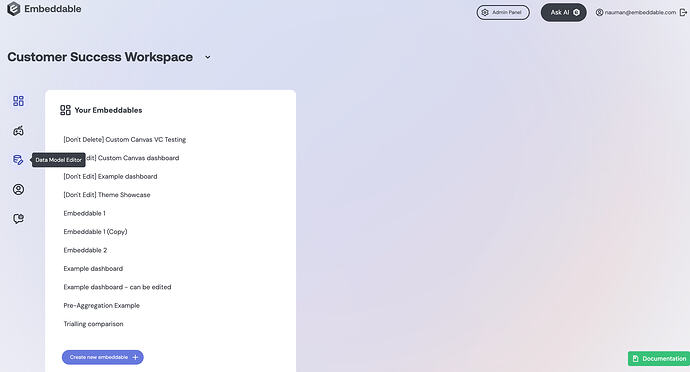
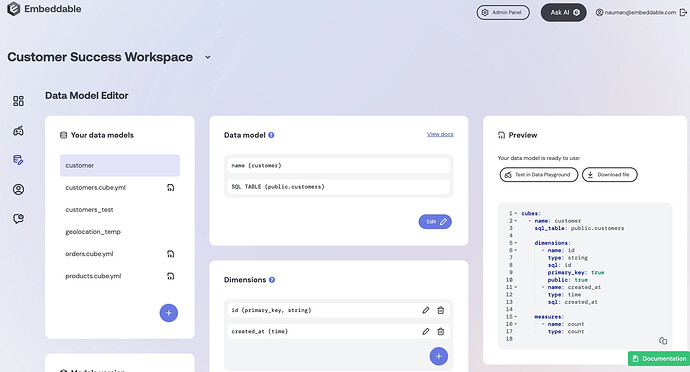
What is the “Refresh” button next to Datasets for?
The Refresh button is specifically for Cube Core / Cube Cloud customers.
When you:
-
Make changes to your models in Cube, and
-
Want those changes reflected in Embeddable
You must click Refresh to sync the updated models via the Data Provider API.
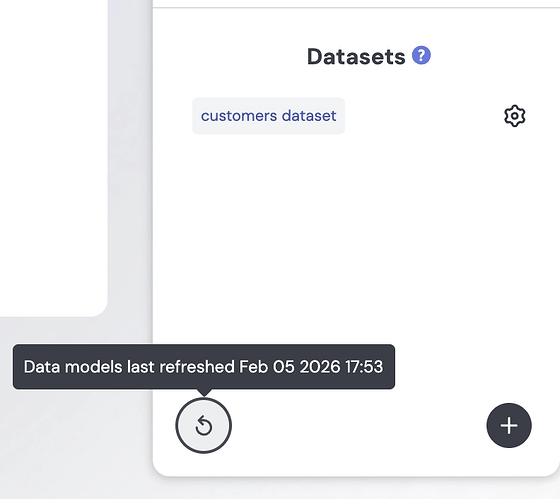
Embeddable Managed Cube customers do not typically need this.
Do I need to use Environments or Connections in Embeddable?
No — not if you are using Cube Core or Cube Cloud.
The following pages are specific to Embeddable Managed Cube:
If you are using your own Cube instance:
-
Your database connections live in Cube.
-
Your environments live in Cube.
-
Embeddable only connects through the Data Provider API.
Which documentation sections do NOT apply to Cube Core / Cloud customers?
The following sections are written for Embeddable Managed Cube customers and are not operationally relevant to BYOC customers:
-
Connect Your Data (except Data Provider API)
-
Data Modelling (except SQL-Based Security (row-level security))
-
Caching / Pre-aggregations (managed within Embeddable)
-
Embeddable Caching API
Important exception: SQL-Based Security (row-level security) does apply to all customers, including Cube Core / Cloud.
Can Cube Core / Cloud customers still read the data modelling docs?
Yes.
The Embeddable data modelling docs are helpful for understanding concepts.
However:
👉 Your source of truth for modelling, schema definitions, caching, and pre-aggregations is the Cube documentation.
All configuration must be done in your Cube instance.
What features apply to ALL customers?
The following areas apply equally to both setups:
-
Building components
-
Creating dashboards
-
Embedding
-
Theming
-
Component SDK
-
Row-level security (SQL-based security)
Everything related to the UI and embedding experience works the same way.
How does Row-Level Security (RLS) work for Cube Core / Cloud customers?
All customers — including BYOC — can test RLS in the Embeddable Builder using:
presets/security-contexts.sc.yml
This file defines named security context presets used during testing.
Example
- name: default
  securityContext:
    country: United States
    language: English
  dataProvider: default

- name: main-instance
  securityContext:
    country: Germany
    language: German
  dataProvider: main-instance
Each preset:
-
Defines RLS identifiers (e.g.
country,customer_id) -
Specifies which
dataProviderto use
This allows you to test SQL-based security directly in the Embeddable Builder.
How do Cube Core / Cloud customers connect to Embeddable?
You connect using the Data Provider API.
That is the only required integration point.
You do NOT need to:
-
Configure database connections in Embeddable
-
Set up environments in Embeddable
-
Create data models in Embeddable
All of that is handled in Cube.
Where do I check errors?
If you are using Cube Core / Cube Cloud:
-
Errors originating from Cube must be investigated in your Cube logs and monitoring tools.
-
Embeddable does not have visibility into your Cube instance.
If you are using Embeddable Managed Cube:
-
Our team has full log visibility.
-
We can help investigate lower-level Cube issues directly.
How Can I Sort by Days of the Week / Months of the Year in Remarkable?February 26, 2026
How can I sort days of the week in the correct order (Mon–Sun) in a table?
If you can’t sort by a field that isn’t displayed, the recommended workaround is to map to a dimension that already includes the sort key.
Example approach
-
Create a new dimension in your model that prefixes the label with a numeric sort value, for example:
-
01 - Monday -
02 - Tuesday -
…
-
07 - Sunday
-
-
Use this new dimension in the table (so sorting works correctly).
-
Translate the displayed label via your theme so users only see
Monday,Tuesday, etc.
This ensures the table sorts correctly (by the numeric prefix) while still showing clean day names to end users.
Why do I need to change the dimension instead of sorting by a hidden field?
In some setups, sorting is only available on fields that are actually used in the visualization. By embedding the sort value into the same dimension you display, you avoid needing a separate “hidden” sort field.
Can I keep the numeric prefix from showing to users?
Yes — after you create the prefixed dimension (e.g. 01 - Monday), you can add a theme translation that maps:
-
01 - Monday→Monday -
02 - Tuesday→Tuesday -
etc.
So you get correct ordering and clean labels.
How Do Security Tokens Behave?February 25, 2026
Do you support domain restrictions for tokens?
Not currently.
At the moment, tokens can be used on any domain. That said, the practical risk is low:
-
Tokens are generated using your API key (which should remain secure).
-
An attacker would need to obtain a valid, unexpired token.
-
Any embedded dashboard would only expose data that the token holder already has access to.
We’ve added domain restriction support as a roadmap item: https://roadmap.embeddable.com/roadmap/restrict-domain-for-security-token-use
Is there an endpoint to validate whether a token is still valid?
We don’t provide a token validation endpoint.
Embeddable tokens are standard JWTs. You can:
-
Decode the token using any JWT library.
-
Inspect the
exp(expiry) claim in the payload. -
Check whether the token has expired.
Since tokens remain valid until their expiry time, checking the expiration date is all that’s required to determine validity.
Recommended flow:
-
Decode the token.
-
If it hasn’t expired, continue using it.
-
If it has expired, generate a new token.
Can tokens be invalidated on logout (instead of relying on time-based expiry)?
Not currently.
Tokens are valid until they expire, and we don’t yet support manual invalidation (e.g. “logout” or “invalidate all tokens” flows).
We’ve added this as a roadmap item: https://roadmap.embeddable.com/roadmap/api-to-invalidate-security-tokens
How Do I Connect Embeddable to MySQL Version 8 / 8.4?February 23, 2026
When connecting a MySQL 8 or MySQL 8.4 (LTS) database to Embeddable, you may encounter the following error:
ER_NOT_SUPPORTED_AUTH_MODE: Client does not support authentication protocol requested by server
This happens because MySQL 8+ uses caching_sha2_password as its default authentication plugin, while Embeddable connects successfully using mysql_native_password.
How to Check Your MySQL Version and Authentication Plugin
You can confirm your MySQL version and user authentication method with:
SELECT VERSION();
SELECT user, host, plugin FROM mysql.user WHERE user = 'your_user';
If:
-
Your version is 8.x (especially 8.4), and
-
The
plugincolumn showscaching_sha2_password,
then this is the cause of the connection failure.
Solution: Create a user/ Alter existing user with mysql_native_password
To connect Embeddable to MySQL 8/8.4, create a user that uses mysql_native_password instead of the default authentication method as mentioned here.
In MySQL 8.4, mysql_native_password is disabled by default and you must enable it at the MySQL server level.
If MySQL is installed on a server or VM
-
Edit your MySQL configuration file (commonly one of the following):
-
/etc/my.cnf -
/etc/mysql/my.cnf -
/etc/mysql/mysql.conf.d/mysqld.cnf
-
-
Under the
[mysqld]section, add:
mysql_native_password=ON
- Restart MySQL:
sudo systemctl restart mysqld
or
sudo systemctl restart mysql
If MySQL is running in Docker
Start the container with native authentication enabled:
--mysql-native-password=ON
(Refer to your container configuration for where to add this option.)
If Using a Managed Service (e.g., RDS, Cloud SQL)
Some managed MySQL services may restrict authentication plugin configuration.
Consult your provider’s documentation to determine whether mysql_native_password can be enabled or whether users can be created explicitly with that plugin.
Step 2: Create a Native Authentication User
Once mysql_native_password is enabled, create a new user:
CREATE USER 'emb_user'@'%' IDENTIFIED WITH mysql_native_password BY 'your_password';
GRANT ALL PRIVILEGES ON your_database.* TO 'emb_user'@'%';
FLUSH PRIVILEGES;
or alter your existing user:
ALTER USER 'emb_user'@'%' IDENTIFIED WITH mysql_native_password BY 'your_password';
GRANT ALL PRIVILEGES ON your_database.* TO 'emb_user'@'%';
FLUSH PRIVILEGES;
Step 3: Use This User in Embeddable
Configure your Embeddable connection using:
-
Host
-
Database
-
Port (typically 3306)
-
Username:
emb_user -
Password: your password
The connection should now succeed.
How Do I Stay Up to Date With Embeddable Package Updates?February 18, 2026
You can run npm run embeddable:upgrade to get the latest versions of all Embeddable NPM packages, including our SDKs and Remarkable Pro. This will update your package.json file automatically, and then you’ll need to run npm i. If you want to automate this process, we recommend setting up a cron job that runs the commands daily, along with the npm run embeddable:buildand npm run embeddable:push steps (if desired).
Note: there is currently no way to automatically publish these new versions - that still requires a manual step. The reason for this is because if there are any compatibility issues or breaking changes, it gives the opportunity to fix things before your clients ever see a problem.
Do You Have a Figma for the Remarkable Components?February 9, 2026
Yes! You can check it out here: https://www.figma.com/community/file/1581738195673665795
Can I Track When My Custom Canvas Is Ready?January 23, 2026
You absolutely can. We’ve introduced a new event, customCanvasReady, that you can listen for like this:
const handleCustomCanvasReady = () => {
  // do whatever you like here
}
element.addEventListener('customCanvasReady', handleCustomCanvasReady);
More information on handling events can be found in our “Interacting With Your Embeddables” documentation.
How Do the Default Environment and data_source Behave?January 19, 2026
Why does every environment require a default data_source?
Embeddable requires each environment to have a default data_source due to how the underlying data modelling layer (Cube.js) resolves queries. This is an implementation detail and is not a configuration requirement in most cases.
How is the default data_source chosen?
When an environment is created, the default data_source is automatically assigned to the first connection included in the environment definition.
When is the default data_source used?
The default data_source is only used if a model does not explicitly define a data_source. If all models specify a data_source, the default is never used.
What is the default environment?
The default environment is an automatically generated environment that cannot be edited. It reflects the current set of available connections and exists as a fallback when no environment is explicitly specified. It is also used by Embeddable sample models.
Why Can’t I Remove a Connection From the Default Environment?January 19, 2026
The default environment is automatically generated and cannot be modified directly. This is intended behavior.
If you need to remove a connection from the default environment, delete the connection itself. When a connection is deleted, it is automatically removed from the default environment.
Why Aren’t My Changes to Models / Components Showing in the Embeddable Builder?January 14, 2026
If you have made a change to your models or components and it’s not showing within the Embeddable builder, these are the things to check:
- Make sure you have re-built your repo after your changes (
npm run embeddable:build) - Make sure you have pushed the re-built changes to your workspace (
npm run embeddable:push) - Refresh your browser
- Check your builder is using your latest models/components version (this should happen automatically)
If you’re still having issues please contact the team and we’ll be happy to help 😊
Why Won't My Dev Server Work in Brave?January 14, 2026
By default, Brave not only denies access to Localhost resources, but does not even enable its pop-up asking if you want to grant access or not. If you’re getting “please make sure your dev server is running” errors even though embeddable:dev is running, please try the following:
- navigate to brave://flags
- search for “localhost”
- change “enable Localhost access permission prompt” to “enabled”
- restart Brave
- refresh the dev server window
This should give you a prompt asking you if you want to allow Embeddable to connect to local resources. If it doesn’t, it’s possible the setting has already been disabled. To correct that, you should be able to do the following:
- Navigate to settings: privacy and security: site and shield settings: view permissions and data stored across sites
- Click “embeddable.com”
- Click “app.[your region].embeddable.com”
- Change “Localhost Access” to “Allow”
- Refresh your dev server window
If you’re still running into trouble, don’t hesitate to reach out!
How Do I Pick Which Remarkable Components to Include When Publishing to Our Workspace?January 9, 2026
You can selectively choose which components are included from the Remarkable Pro chart library to appear in your workspace like so:
componentLibraries: [{
   name: '@embeddable.com/remarkable-ui',
   include: ['BarChart', 'DateRangePicker']
}],
What Should I Check When Renaming Dimensions or Measures in a Cube Model?January 8, 2026
⚠️ Important: Prefer title property Over Renaming (Best Practice)
If your goal is only to change how a dimension or measure appears to end users, do not rename it.
Instead, use the title property.
The title property is a non-breaking way to update display names without affecting:
-
Cube model references
-
Joins and pre-aggregations
-
Embeddable dashboards
How the title Property Works
-
name→ Internal, stable identifier (used in all references) -
title→ Display label shown to end users only
cubes:
  - name: orders
    sql_table: orders

    dimensions:
      - name: customer_id
        sql: customer_id
        type: number
        title: "Customer ID"

    measures:
      - name: total_revenue
        sql: amount
        type: sum
        title: "Total Sales Revenue"
👉 Only rename name when a true semantic change is required.
If you must rename, follow the checklist below.
1. References Within the Same Cube
Derived measures Check measures that reference other measures or dimensions.
measures:
  - name: profit_margin
    sql: 100.0 * ({profit} / {revenue})
Computed / filtered dimensions Look for dimensions that reference other dimensions or measures.
dimensions:
  - name: is_completed
    sql: "{CUBE}.status = 'completed'"
2. References in Joins and Across Cubes
Join conditions Update all join SQL that references the renamed field.
joins:
  - name: customers
    sql: "{CUBE}.customer_id = {customers}.id"
Cross-cube references Check other cubes that reference this field.
sql: "{orders}.status"
3. Pre-Aggregation References
If the renamed field is used in a pre-aggregation, update:
-
measures -
dimensions -
time_dimension -
partition_dimension
pre_aggregations:
  - name: orders_by_month
    measures: total_revenue
    dimensions: status
    time_dimension: created_at
4. Embeddable Frontend Usage
If the renamed field is used as a time dimension in an Embeddable FE component:
-
Ensure the generated query in the Embeddable Builder uses the new name
-
Otherwise, the component will error due to a stale reference
5. Testing Process
After completing the rename:
-
Global search Search the entire project for the old field name to catch missed references.
-
Direct usage tests Run queries that reference the renamed dimension or measure directly.
-
Indirect dependency tests Test queries that rely on the renamed field indirectly (joins, derived measures, filters, pre-aggregations).
How Can I See the Custom Canvas Dashboards My Users Have Created / Customised for Themselves?December 11, 2025
The custom canvas created by a user gets stored against the customCanvasState key that you pass to Tokens API. This is explained in detail here. In order to see the dashboard that a user has created, simply generate a token using their embeddableId and their customCanvasState and use that to render an embeddable and you'll see exactly what they see. You can even pass customCanvasReadOnly: true to the Tokens API to make sure that you're only seeing a read-only view of what they see.