AI Endpoints
This feature is still in Beta. APIs and behaviour may change. Reach out to the Embeddable team if you have questions or run into issues.
Embeddable exposes a set of API endpoints under /ai/v1/* that allow you to connect an AI agent to your users' data and dashboards. The agent can query data models, inspect the charts already on a user's canvas, and create or modify charts on their behalf — without the user having to build anything manually.
This is useful when you want to enable conversational insights (i.e. ask questions about the data without building charts) or allow end users to describe what they want in natural language — "show me sales performance this quarter" — and have your AI translate that into fully rendered charts on their Custom Canvas.
End users in this context are your customers — the people using the product you've built on top of Embeddable.
Setup
Getting started with the AI endpoints is straightforward but requires the following initial steps. For a more complete description, see our Custom Canvas documentation.
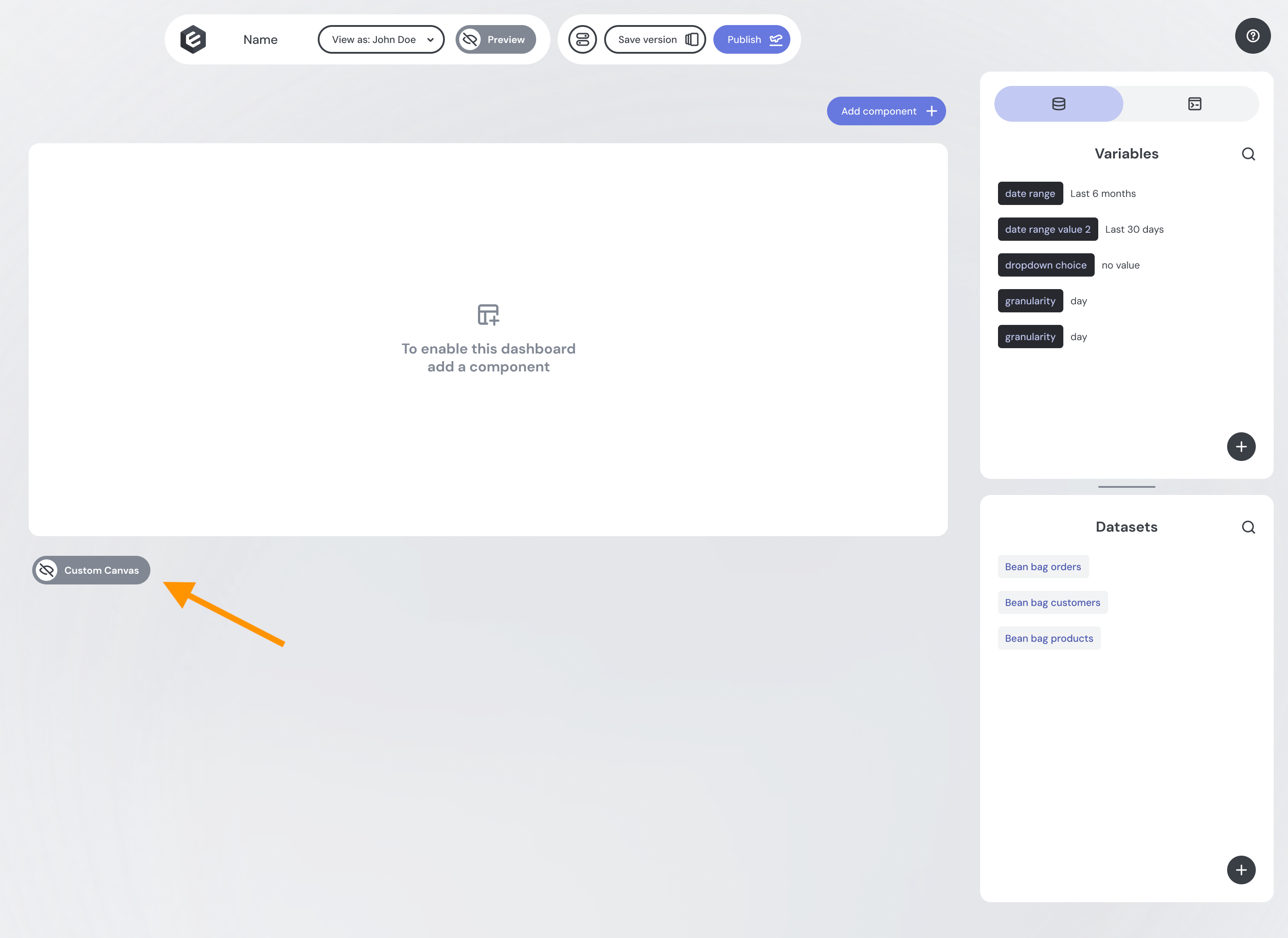
Enable Custom Canvas in the builder
Simply toggle the "Custom Canvas" option in your dashboard's settings. This allows your end users to create and manage their own charts.
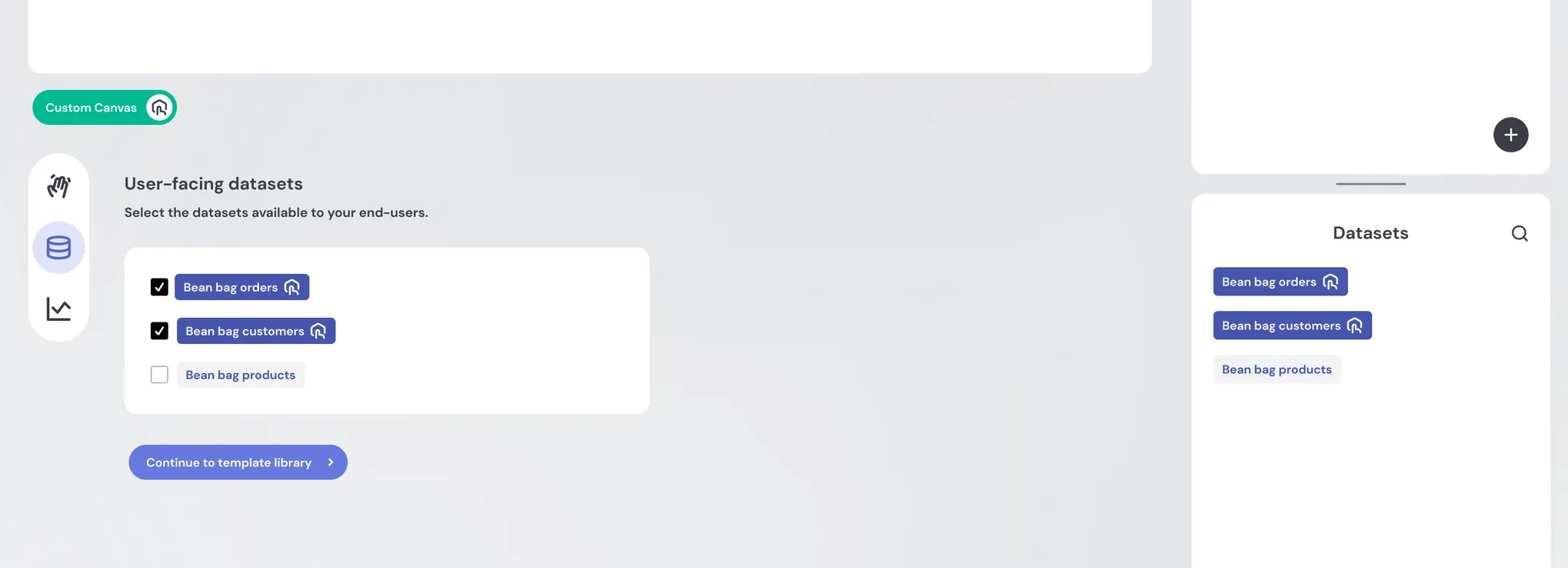
Add datasets the user and AI can use for Custom Canvas
Add datasets to your dashboard and enable them for Custom Canvas. The AI agent will only be able to query datasets that are enabled for Custom Canvas.
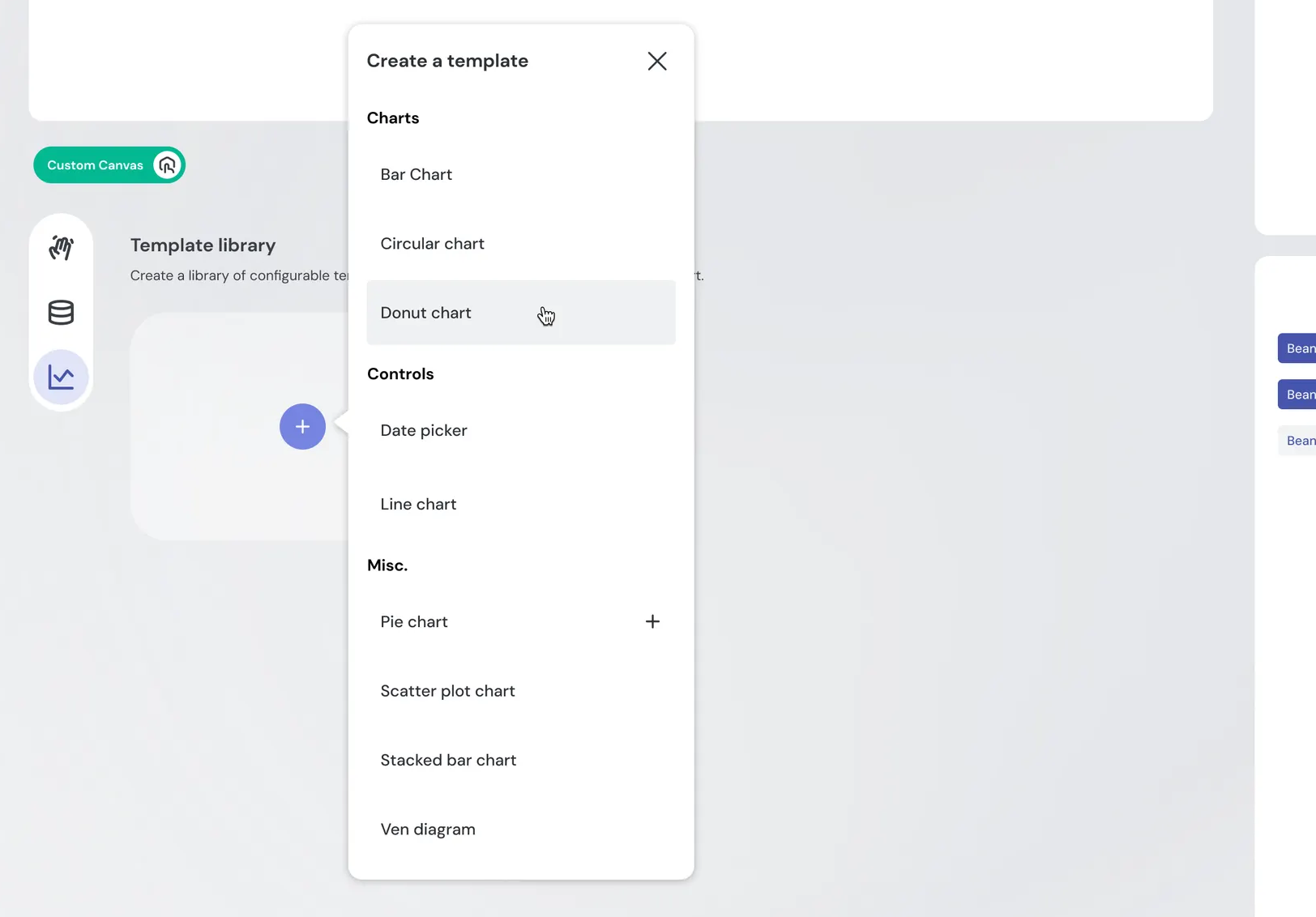
Create Templates with widgets the end user or AI can use for Custom Canvas
To give the ai agent more options, add templates for many types of charts and leave them open (no set dataset or filters)
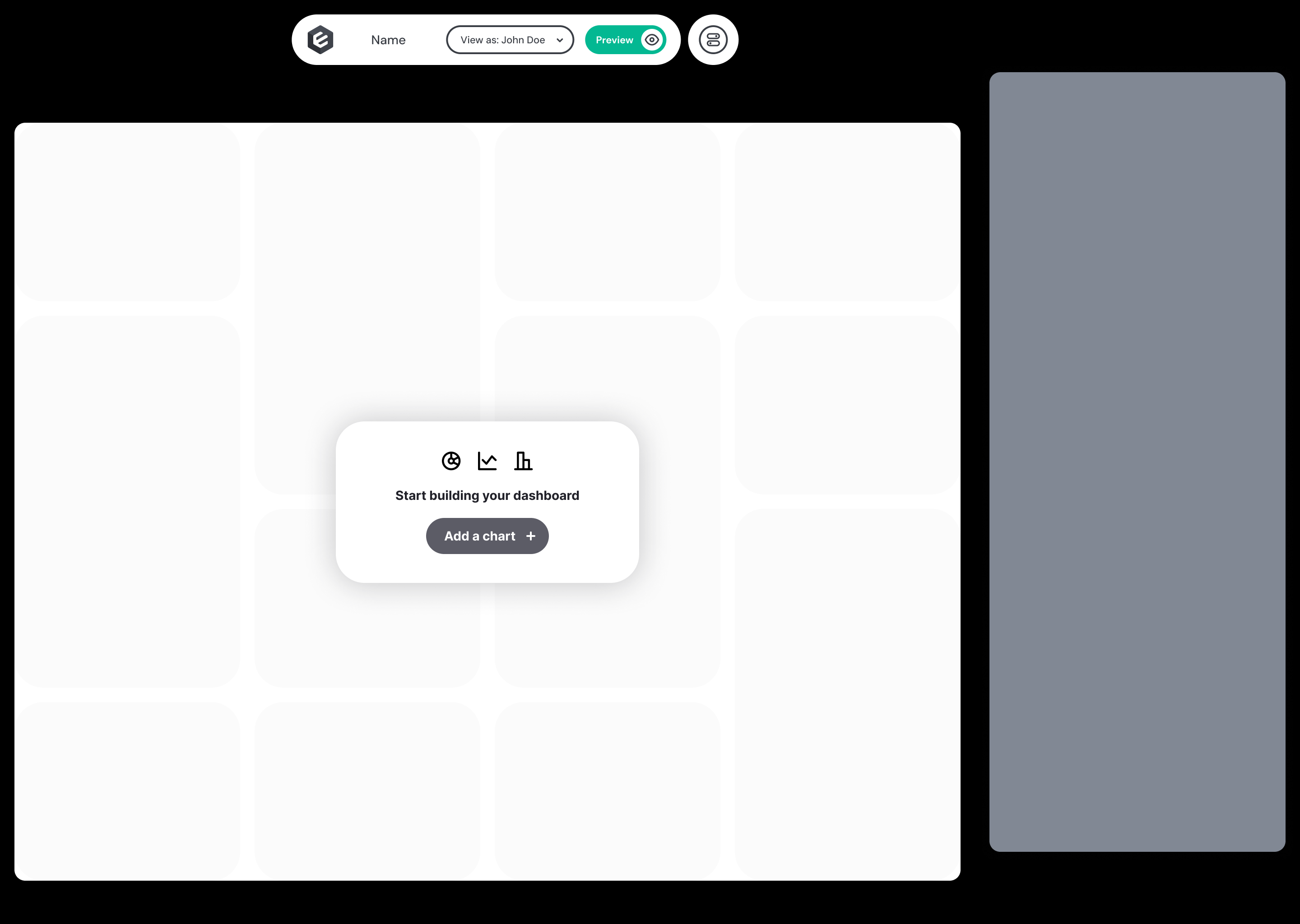
Publish custom canvas
You'll need to publish your dashboard with the Custom Canvas enabled and at least one dataset defined and enabled within Custom Canvas in order to proceed. Otherwise, the API endpoints won’t be able to query your data!
Create a security token
You can learn more about creating a security token on our Tokens Api Page.
Important note: you must have Custom Canvas enabled on your dashboard and at least one dataset defined and enabled within Custom Canvas in order to proceed. Otherwise, the API endpoints won’t be able to query your data!
Base URL
EU:  https://api.eu.embeddable.com
US:  https://api.us.embeddable.com
All endpoint paths below are relative to this base.
Authorization
All /ai/v1/* endpoints are authenticated using the same security token you already generate for your end users. No new authentication mechanism is required.
Pass it as a Bearer token on every request:
Authorization: Bearer <security-token-jwt>The token encodes:
- Which data models the user is allowed to see (via row-level security)
- Which Custom Canvas chart types are available to the user
- The embeddable context the token is scoped to
Generate a token server-side for the end user and pass it to your AI agent. Every response is automatically scoped to that user's security context.
// Always generate tokens server-side — never from client code
const response = await fetch('https://api.eu.embeddable.com/api/v1/security-token', {
  method: 'POST',
  headers: {
    'Content-Type': 'application/json',
    'Authorization': `Bearer ${apiKey}`
  },
  body: JSON.stringify({
    embeddableId: '<dashboard-id>',
    savedVersion: 'production',
    user: 'user@example.com',
    // ... other fields
  })
});
const { token } = await response.json();
// Pass `token` to your AI agent for all /ai/v1/* calls
See the Tokens API for the full list of token parameters.
How it works
A typical agent flow looks like this:
End User
  │  "Add a KPI chart showing sales performance this quarter in terms of dollars"
  ▼
Customer's AI Agent
  │  GET  /ai/v1/embeddable/metadata          → available chart types & datasets
  │  GET  /ai/v1/models                       → data model schema
  │  POST /ai/v1/query                        → run and verify a data query
  │  GET  /ai/v1/custom-canvas/request-state  → current canvas contents
  │  POST /ai/v1/custom-canvas/create         → place chart on canvas
  ▼
Embeddable API  (authenticated via Security Token)
  │  Applies row-level security
  │  Writes chart to end user's Custom Canvas
  ▼
End User sees the chart on their canvas
The AI reasoning stays with your agent. Embeddable provides the tools it needs: data access, chart rendering, and canvas management.
You can also use the agent without rendering a chart, simply asking a question that would return an answer based on the data. For example, "Show me sales performance this quarter" might return a table of results or a summary of the data, without creating a chart on the canvas. Here is an example of that flow:
End User
  │  "Show me sales performance this quarter"
  ▼
Customer's AI Agent
  │  GET  /ai/v1/embeddable/metadata          → available chart types & datasets
  │  GET  /ai/v1/models                       → data model schema
  │  POST /ai/v1/query                        → run and verify a data query
  ▼
Embeddable API  (authenticated via Security Token)
  │  Applies row-level security
  │  Returns data to the agent
  ▼
End User sees the data in the agent's response (table, summary, etc.)
Read endpoints
GET /ai/v1/embeddable/metadata
Returns the full configuration for the embeddable — widgets, datasets, variables, and layout parameters. Use this as the starting point for any agent that needs to understand what chart types and data sources are available.
Key relationships:
datasets[].idis thedatasetIdrequired byPOST /ai/v1/querytemplateWidgets[].idis thetemplateIdused inPOST /ai/v1/custom-canvas/createstarterCanvasWidgetsare pre-built layout presets the agent can use to seed the canvas
Response 200 OK
{
  "widgets": [
    {
      "id": "<uuid>",
      "name": "string",
      "inputConfiguration": { "<inputName>": "<value>" }
    }
  ],
  "selfServeWidgets": [ { "..." } ],
  "templateWidgets": [
    {
      "id": "<uuid>",
      "name": "string",
      "inputConfiguration": { "..." }
    }
  ],
  "starterCanvasWidgets": [
    {
      "id": "<uuid>",
      "templateId": "<uuid>",
      "inputConfiguration": { "..." },
      "filters": {},
      "limit": {},
      "order": {},
      "w": 4,
      "h": 3
    }
  ],
  "variables": [
    {
      "id": "<uuid>",
      "name": "string",
      "type": "string",
      "defaultValue": "string",
      "array": false
    }
  ],
  "variableListeners": { "<variableId>": ["<dependentVariableId>"] },
  "dashboardParams": { "..." },
  "datasets": [
    {
      "id": "<uuid>",
      "name": "string",
      "model": "string",
      "availableInCustomCanvas": true
    }
  ],
  "bundleHash": "string"
}
GET /ai/v1/models
Returns all available Cube.js data models — the schema the agent needs to construct valid queries (dimension and measure names, types, and descriptions).
Key notes:
nameon dimensions and measures follows the pattern<modelName>.<fieldName>— use this exact string in query bodies__type__is"dimension"or"measure"
Response 200 OK
[
  {
    "name": "orders",
    "title": "Orders",
    "connectedComponent": 1,
    "dimensions": [
      {
        "name": "orders.status",
        "title": "Status",
        "nativeType": "string",
        "description": "Order status",
        "meta": null,
        "__type__": "dimension"
      }
    ],
    "measures": [
      {
        "name": "orders.count",
        "title": "Count",
        "nativeType": "number",
        "description": null,
        "meta": null,
        "__type__": "measure"
      }
    ]
  }
]
POST /ai/v1/query
Executes a structured data query against a dataset. Returns raw rows and an optional total count.
Request headers
| Header | Required | Description |
|---|---|---|
Authorization | ✅ | Bearer <security-token-jwt> |
External-System-Request-Id | ☐ | Client-assigned idempotency UUID. Defaults to a random UUID. |
External-System-Request-Sequence-Number | ☐ | Sequence number for ordering requests within a logical operation. Defaults to 1. |
Request body
| Field | Type | Required | Description |
|---|---|---|---|
datasetId | UUID | ✅ | ID of the dataset to query (from GET /ai/v1/embeddable/metadata) |
dimensions | string[] | ☐ | Dimension names in model.field format |
measures | string[] | ☐ | Measure names in model.field format |
filters | Filter[] | ☐ | Array of filter conditions (see below) |
timeDimensions | TimeDimension[] | ☐ | Time-based filters with optional granularity (see below) |
order | string[][] | ☐ | Sort order: [["model.field", "asc"]] |
limit | integer | ☐ | Max rows to return |
offset | long | ☐ | Rows to skip (for pagination) |
timezone | string | ☐ | IANA timezone, e.g. "America/New_York" |
countRows | boolean | ☐ | If true, include total row count in response. Default: false |
Filter object
| Field | Type | Required | Description |
|---|---|---|---|
member | string | ✅ | Dimension or measure name (model.field) |
operator | string | ✅ | One of: equals, notEquals, contains, notContains, startsWith, endsWith, gt, gte, lt, lte, set, notSet, inDateRange, notInDateRange, beforeDate, afterDate, measureFilter |
values | any[] | ☐ | Filter values. Omit for set / notSet operators. |
TimeDimension object
| Field | Type | Required | Description |
|---|---|---|---|
dimension | string | ✅ | Date/time dimension name |
dateRange | string or string[2] | ☐ | Named range (e.g. "last 7 days") or ["YYYY-MM-DD", "YYYY-MM-DD"] |
granularity | string | ☐ | second, minute, hour, day, week, month, quarter, year |
Example request
{
  "datasetId": "<uuid>",
  "dimensions": ["orders.status", "orders.createdAt"],
  "measures": ["orders.count", "orders.revenue"],
  "filters": [
    { "member": "orders.status", "operator": "equals", "values": ["completed"] }
  ],
  "timeDimensions": [
    {
      "dimension": "orders.createdAt",
      "dateRange": ["2024-01-01", "2024-12-31"],
      "granularity": "month"
    }
  ],
  "order": [["orders.createdAt", "asc"]],
  "limit": 100,
  "offset": 0,
  "timezone": "America/New_York",
  "countRows": false
}
Response 200 OK
{
  "cubeRequestId": "<uuid>",
  "externalRequestId": "<uuid>",
  "requestSequenceNumber": 1,
  "data": [
    { "orders.status": "completed", "orders.count": 142 }
  ],
  "total": 142,
  "error": null,
  "preAggregationTriggered": false
}| Field | Description |
|---|---|
data | Result rows. Keys are model.field strings. |
total | Total row count. Only present when countRows: true. |
error | Error message if the query failed; otherwise null. |
cubeRequestId | Internal request ID assigned by Cube. |
externalRequestId | Echoes the External-System-Request-Id header. |
GET /ai/v1/custom-canvas/request-state
Returns the current state of the end user's Custom Canvas — all widgets currently placed, including their positions, sizes, configurations, and applied filters. This is per-user, scoped to the security token.
Key notes:
versionincrements on every mutation — use it to detect stale readscomponents[].idis the widget instance UUID required by the update, delete, resize, and reorder endpoints
Response 200 OK
{
  "components": [
    {
      "id": "<uuid>",
      "templateId": "<uuid>",
      "key": "string",
      "inputConfiguration": { "<inputName>": "<value>" },
      "subInputConfiguration": {
        "<parentInputName>": {
          "<parentValue>": { "<subInputName>": "<value>" }
        }
      },
      "filters": {
        "<datasetName>": [
          {
            "member": "model.field",
            "operator": "equals",
            "value": "x",
            "valueType": "string",
            "nativeDataType": "string"
          }
        ]
      },
      "limit": { "<datasetName>": 100 },
      "order": { "<datasetName>": ["model.field asc"] },
      "w": 4,
      "h": 3,
      "heightResolution": null,
      "widthResolution": null
    }
  ],
  "version": 5
}
Custom Canvas mutation endpoints
These endpoints let your AI agent create, update, and manage charts on the end user's Custom Canvas. Charts created via the API appear in the same place as manually built charts.
All mutation endpoints require a requestId — a client-assigned UUID used as an idempotency key.
Documentation gap: It is not yet documented how the frontend is notified when the AI agent mutates the Custom Canvas, so that the embedded dashboard re-renders to show new or updated charts.
POST /ai/v1/custom-canvas/create
Add a new widget to the custom canvas.
Request body
| Field | Type | Required | Constraints | Description |
|---|---|---|---|---|
id | UUID | ✅ | — | Client-assigned UUID for the new widget instance |
templateId | UUID | ✅ | — | UUID of a template widget (from templateWidgets in metadata) |
requestId | UUID | ✅ | — | Idempotency key |
inputConfiguration | Map<string, any> | ✅ | — | Input values keyed by input name. Key names come from the template's definition — check templateWidgets[].inputConfiguration in the metadata response. Member values (dimensions, measures) must be full member objects, not plain strings (see example below). |
subInputConfiguration | Map<string, Map<string, Map<string, any>>> | ☐ | — | Nested per-value input overrides |
filters | Map<string, Filter[]> | ☐ | — | Per-dataset filter overrides |
limit | Map<string, int> | ☐ | — | Per-dataset row limit |
order | Map<string, string[]> | ☐ | — | Per-dataset sort order |
w | integer | ☐ | 1–16 | Width in grid columns. Default: 1 |
h | integer | ☐ | 1–12 | Height in grid rows. Default: 1 |
heightResolution | integer | ☐ | 1–4 | Height resolution multiplier |
widthResolution | integer | ☐ | 1–2 | Width resolution multiplier |
The inputConfiguration key for a measure input varies by chart type — for example "measure" (KPI, Donut) or "measures" (Bar Chart, Line Chart). Check the template's definition in GET /ai/v1/embeddable/metadata to confirm the correct key for your chart type. Member values must be full member objects as returned by GET /ai/v1/models, not plain "model.field" strings.
Example request
{
  "id": "<uuid>",
  "templateId": "<uuid>",
  "requestId": "<uuid>",
  "inputConfiguration": {
    "datasetId": "<uuid>",
    "measure": {
      "name": "orders.count",
      "title": "Count",
      "nativeType": "number",
      "description": null,
      "meta": null,
      "__type__": "measure"
    }
  },
  "filters": {},
  "limit": {},
  "order": {},
  "w": 4,
  "h": 3
}
Response 201 Created — empty body
PUT /ai/v1/custom-canvas/update
Replace the configuration of an existing canvas widget. All supplied fields overwrite the current values.
Request body
| Field | Type | Required | Description |
|---|---|---|---|
id | UUID | ✅ | UUID of the widget to update (from GET /ai/v1/custom-canvas/request-state) |
requestId | UUID | ✅ | Idempotency key |
inputConfiguration | Map<string, any> | ✅ | Full replacement input configuration |
subInputConfiguration | Map<string, Map<string, Map<string, any>>> | ☐ | Full replacement sub-input configuration |
filters | Map<string, Filter[]> | ☐ | Full replacement per-dataset filters |
limit | Map<string, int> | ☐ | Full replacement per-dataset limits |
order | Map<string, string[]> | ☐ | Full replacement per-dataset sort orders |
Example request
{
  "id": "<uuid>",
  "requestId": "<uuid>",
  "inputConfiguration": {
    "datasetId": "<uuid>",
    "measure": {
      "name": "orders.revenue",
      "title": "Revenue",
      "nativeType": "number",
      "description": null,
      "meta": null,
      "__type__": "measure"
    }
  },
  "filters": {},
  "limit": {},
  "order": {}
}
Response 204 No Content
DELETE /ai/v1/custom-canvas/delete
Remove a widget from the canvas.
Request body
| Field | Type | Required | Description |
|---|---|---|---|
id | UUID | ✅ | UUID of the widget to delete (from GET /ai/v1/custom-canvas/request-state) |
requestId | UUID | ✅ | Idempotency key |
Example request
{
  "id": "<uuid>",
  "requestId": "<uuid>"
}
Response 204 No Content
POST /ai/v1/custom-canvas/reorder
Change the display order of widgets on the canvas.
Request body
| Field | Type | Required | Description |
|---|---|---|---|
updates | Map<UUID, int> | ✅ | Map of widget UUID → new zero-based display index |
requestId | UUID | ✅ | Idempotency key |
Example request
{
  "updates": {
    "<widget-uuid>": 0,
    "<widget-uuid-2>": 1
  },
  "requestId": "<uuid>"
}
Response 204 No Content
POST /ai/v1/custom-canvas/resize
Change the dimensions of a canvas widget within the grid.
Request body
| Field | Type | Required | Constraints | Description |
|---|---|---|---|---|
id | UUID | ✅ | — | UUID of the widget to resize |
requestId | UUID | ✅ | — | Idempotency key |
w | integer | ✅ | 1–16 | New width in grid columns |
h | integer | ✅ | 1–12 | New height in grid rows |
heightResolution | integer | ☐ | 1–4 | Height resolution multiplier |
widthResolution | integer | ☐ | 1–2 | Width resolution multiplier |
Example request
{
  "id": "<uuid>",
  "requestId": "<uuid>",
  "w": 8,
  "h": 4
}
Response 204 No Content
Error handling
All errors return 400 Bad Request with the following body:
{
  "errorType": "PROBLEM_LOADING_DATA",
  "message": "...",
  "retryMessage": "Try again later"
}
Scenarios
Using the AI endpoints without an existing embeddable
If you want to use the data querying endpoints without having set up an embeddable for your end users, create a minimal embeddable in your workspace and use it solely to generate security tokens for your AI agent.
Multiple embeddables on the same page
If you render multiple embeddables simultaneously on a single page, each has its own security token. Pass all tokens to your AI agent. The agent should identify the correct token for each operation — for example by correlating available chart types and data models to the right embeddable.
Customer's AI Agent
  │  Receives tokens: [token_A (embeddable A), token_B (embeddable B)]
  │
  ├── GET /ai/v1/embeddable/metadata (token_A) → chart types for embeddable A
  ├── GET /ai/v1/embeddable/metadata (token_B) → chart types for embeddable B
  │
  │  AI identifies which embeddable is relevant for the operation
  │
  ├── POST /ai/v1/custom-canvas/create (token_A) → chart on embeddable A canvas
  └── POST /ai/v1/custom-canvas/create (token_B) → chart on embeddable B canvas
Example MCP Code
A ready-to-use MCP (opens in a new tab) server (Python / FastMCP) implementing all tools above is available below. It exposes the full /ai/v1/* surface as MCP tools that any MCP-compatible AI agent can call.
Dependencies
pip install fastmcp httpxEnvironment variables
| Variable | Description |
|---|---|
EMBEDDABLE_BASE_URL | Base URL of your Embeddable instance (e.g. https://api.eu.embeddable.com) |
EMBEDDABLE_TOKEN | Security token JWT for the end user |
Run
python mcp_ai_agent.pyAvailable MCP tools
| Tool | Endpoint |
|---|---|
get_embeddable_metadata | GET /ai/v1/embeddable/metadata |
get_datasets | GET /ai/v1/embeddable/metadata (returns datasets only) |
get_models | GET /ai/v1/models |
execute_query | POST /ai/v1/query |
get_canvas_state | GET /ai/v1/custom-canvas/request-state |
create_canvas_widget | POST /ai/v1/custom-canvas/create |
update_canvas_widget | PUT /ai/v1/custom-canvas/update |
delete_canvas_widget | DELETE /ai/v1/custom-canvas/delete |
reorder_canvas_widgets | POST /ai/v1/custom-canvas/reorder |
resize_canvas_widget | POST /ai/v1/custom-canvas/resize |
mcp_ai_agent.py
import os
import json
import httpx
from mcp.server.fastmcp import FastMCP

mcp = FastMCP("embeddable-ai-agent")

BASE_URL = os.getenv("EMBEDDABLE_BASE_URL", "")
TOKEN = os.getenv("EMBEDDABLE_TOKEN", "")


def headers():
    if not TOKEN:
        raise ValueError("EMBEDDABLE_TOKEN is not set. Please set it via environment variable or ask the user.")
    return {"Authorization": f"Bearer {TOKEN}", "Content-Type": "application/json"}


@mcp.tool()
def get_models() -> str:
    """Returns available Cube data models with their dimensions and measures."""
    with httpx.Client() as client:
        response = client.get(f"{BASE_URL}/ai/v1/models", headers=headers())
        response.raise_for_status()
        return json.dumps(response.json(), indent=2)


@mcp.tool()
def execute_query(
    dataset_id: str,
    dimensions: list[str] | None = None,
    measures: list[str] | None = None,
    filters: list[dict] | None = None,
    time_dimensions: list[dict] | None = None,
    order: list[list[str]] | None = None,
    limit: int | None = None,
    offset: int | None = None,
    timezone: str | None = None,
    count_rows: bool = False,
) -> str:
    """
    Execute a data query against the embeddable's model.

    dataset_id: UUID of the dataset to query against.

    filters format: [{"member": "model.field", "operator": "equals", "values": ["value"]}]
    Operators: equals, notEquals, contains, notContains, startsWith, endsWith, gt, gte, lt, lte, set, notSet, inDateRange, notInDateRange, beforeDate, afterDate, measureFilter

    time_dimensions format: [{"dimension": "model.date", "dateRange": ["YYYY-MM-DD", "YYYY-MM-DD"], "granularity": "day"}]
    Granularity options: second, minute, hour, day, week, month, quarter, year

    order format: [["model.field", "asc"]]
    """
    body = {k: v for k, v in {
        "datasetId": dataset_id,
        "dimensions": dimensions,
        "measures": measures,
        "filters": filters,
        "timeDimensions": time_dimensions,
        "order": order,
        "limit": limit,
        "offset": offset,
        "timezone": timezone,
        "countRows": count_rows,
    }.items() if v is not None}

    with httpx.Client() as client:
        response = client.post(f"{BASE_URL}/ai/v1/query", headers=headers(), json=body)
        response.raise_for_status()
        return json.dumps(response.json(), indent=2)


@mcp.tool()
def get_datasets() -> str:
    """Returns available datasets with their id, name, model, and availableInCustomCanvas flag. Use this to resolve a datasetId before calling execute_query."""
    with httpx.Client() as client:
        response = client.get(f"{BASE_URL}/ai/v1/embeddable/metadata", headers=headers())
        response.raise_for_status()
        return json.dumps(response.json().get("datasets", []), indent=2)


@mcp.tool()
def get_embeddable_metadata() -> str:
    """
    Returns full embeddable config including:
    - widgets: configured chart/table widgets with their inputConfiguration
    - selfServeWidgets: self-serve widgets available for the canvas
    - templateWidgets: reusable template chart definitions
    - starterCanvasWidgets: pre-built starter layout widgets (each has id, templateId, inputConfiguration, filters, limit, order, w, h)
    - variables: dashboard variables (id, name, type, defaultValue, array)
    - variableListeners: variable dependency graph
    - dashboardParams: global dashboard parameters
    - datasets: available datasets (id, name, model, availableInCustomCanvas)
    - bundleHash: current bundle version hash
    """
    with httpx.Client() as client:
        response = client.get(f"{BASE_URL}/ai/v1/embeddable/metadata", headers=headers())
        response.raise_for_status()
        return json.dumps(response.json(), indent=2)


@mcp.tool()
def get_canvas_state() -> str:
    """
    Returns the current custom canvas state including:
    - components: list of widgets on the canvas, each with:
        - id (UUID), templateId (UUID), key (string)
        - inputConfiguration: Map<string, any> of input values
        - subInputConfiguration: nested per-value input overrides
        - filters: Map<datasetName, list of filters> where each filter has member, operator, value, valueType, nativeDataType
        - limit: Map<datasetName, int>
        - order: Map<datasetName, list of strings>
        - w (1-16), h (1-12), heightResolution (1-4), widthResolution (1-2)
    - version: canvas version number
    """
    with httpx.Client() as client:
        response = client.get(f"{BASE_URL}/ai/v1/custom-canvas/request-state", headers=headers())
        response.raise_for_status()
        return json.dumps(response.json(), indent=2)


@mcp.tool()
def create_canvas_widget(
    id: str,
    template_id: str,
    request_id: str,
    input_configuration: dict,
    sub_input_configuration: dict | None = None,
    filters: dict | None = None,
    limit: dict | None = None,
    order: dict | None = None,
    w: int = 1,
    h: int = 1,
    height_resolution: int | None = None,
    width_resolution: int | None = None,
) -> str:
    """
    Add a new widget to the custom canvas.

    id: UUID for the new widget instance.
    template_id: UUID of the template chart to instantiate (from get_embeddable_metadata templateWidgets).
    request_id: Unique UUID for this request (for idempotency).
    input_configuration: Map of input name -> value. Key names come from the template definition (e.g. "measure" for KPI/Donut, "measures" for Bar/Line). Member values must be full member objects: {"name": "model.field", "title": "...", "nativeType": "...", "__type__": "measure"}.
    sub_input_configuration: Optional nested per-value input overrides. Key is parent input name (e.g. "columns"),
        value is Map<parentValue, Map<inputName, any>>.
    filters: Optional Map<datasetName, list of filters>. Each filter: {"member": "model.field", "operator": "equals", "value": "x", "valueType": "...", "nativeDataType": "..."}.
    limit: Optional Map<datasetName, int> row limits per dataset.
    order: Optional Map<datasetName, list of strings> sort order per dataset.
    w: Width in grid columns (1-16, default 1).
    h: Height in grid rows (1-12, default 1).
    height_resolution: Optional height resolution multiplier (1-4).
    width_resolution: Optional width resolution multiplier (1-2).
    """
    body = {k: v for k, v in {
        "id": id,
        "templateId": template_id,
        "requestId": request_id,
        "inputConfiguration": input_configuration,
        "subInputConfiguration": sub_input_configuration,
        "filters": filters,
        "limit": limit,
        "order": order,
        "w": w,
        "h": h,
        "heightResolution": height_resolution,
        "widthResolution": width_resolution,
    }.items() if v is not None}
    with httpx.Client() as client:
        response = client.post(f"{BASE_URL}/ai/v1/custom-canvas/create", headers=headers(), json=body)
        response.raise_for_status()
        return json.dumps(response.json(), indent=2)


@mcp.tool()
def update_canvas_widget(
    id: str,
    request_id: str,
    input_configuration: dict,
    sub_input_configuration: dict | None = None,
    filters: dict | None = None,
    limit: dict | None = None,
    order: dict | None = None,
) -> str:
    """
    Update an existing widget on the custom canvas.

    id: UUID of the widget to update (from get_canvas_state components).
    request_id: Unique UUID for this request (for idempotency).
    input_configuration: Full replacement Map of input name -> value.
    sub_input_configuration: Optional nested per-value input overrides (replaces existing).
    filters: Optional Map<datasetName, list of filters> (replaces existing).
    limit: Optional Map<datasetName, int> (replaces existing).
    order: Optional Map<datasetName, list of strings> (replaces existing).
    """
    body = {k: v for k, v in {
        "id": id,
        "requestId": request_id,
        "inputConfiguration": input_configuration,
        "subInputConfiguration": sub_input_configuration,
        "filters": filters,
        "limit": limit,
        "order": order,
    }.items() if v is not None}
    with httpx.Client() as client:
        response = client.put(f"{BASE_URL}/ai/v1/custom-canvas/update", headers=headers(), json=body)
        response.raise_for_status()
        return json.dumps(response.json(), indent=2)


@mcp.tool()
def delete_canvas_widget(id: str, request_id: str) -> str:
    """
    Remove a widget from the custom canvas.

    id: UUID of the widget to delete (from get_canvas_state components).
    request_id: Unique UUID for this request (for idempotency).
    """
    body = {"id": id, "requestId": request_id}
    with httpx.Client() as client:
        response = client.request("DELETE", f"{BASE_URL}/ai/v1/custom-canvas/delete", headers=headers(), json=body)
        response.raise_for_status()
        return "Deleted successfully"


@mcp.tool()
def reorder_canvas_widgets(updates: dict, request_id: str) -> str:
    """
    Reorder widgets on the custom canvas.

    updates: Map of widget UUID -> new zero-based index position (e.g. {"<uuid>": 0, "<uuid2>": 1}).
    request_id: Unique UUID for this request (for idempotency).
    """
    body = {"updates": updates, "requestId": request_id}
    with httpx.Client() as client:
        response = client.post(f"{BASE_URL}/ai/v1/custom-canvas/reorder", headers=headers(), json=body)
        response.raise_for_status()
        return "Reordered successfully"


@mcp.tool()
def resize_canvas_widget(
    id: str,
    request_id: str,
    w: int,
    h: int,
    height_resolution: int | None = None,
    width_resolution: int | None = None,
) -> str:
    """
    Resize a widget on the custom canvas.

    id: UUID of the widget to resize (from get_canvas_state components).
    request_id: Unique UUID for this request (for idempotency).
    w: New width in grid columns (1-16).
    h: New height in grid rows (1-12).
    height_resolution: Optional height resolution multiplier (1-4).
    width_resolution: Optional width resolution multiplier (1-2).
    """
    body = {k: v for k, v in {
        "id": id,
        "requestId": request_id,
        "w": w,
        "h": h,
        "heightResolution": height_resolution,
        "widthResolution": width_resolution,
    }.items() if v is not None}
    with httpx.Client() as client:
        response = client.post(f"{BASE_URL}/ai/v1/custom-canvas/resize", headers=headers(), json=body)
        response.raise_for_status()
        return "Resized successfully"


if __name__ == "__main__":
    mcp.run()